For blind and low-vision people

Your phone becomes a guide that sees the path ahead.

WisePath warns you about obstacles, holes and the edge of the path – with the distance – in a calm, natural voice. Indoors and outdoors, with nothing more than the phone you already have.

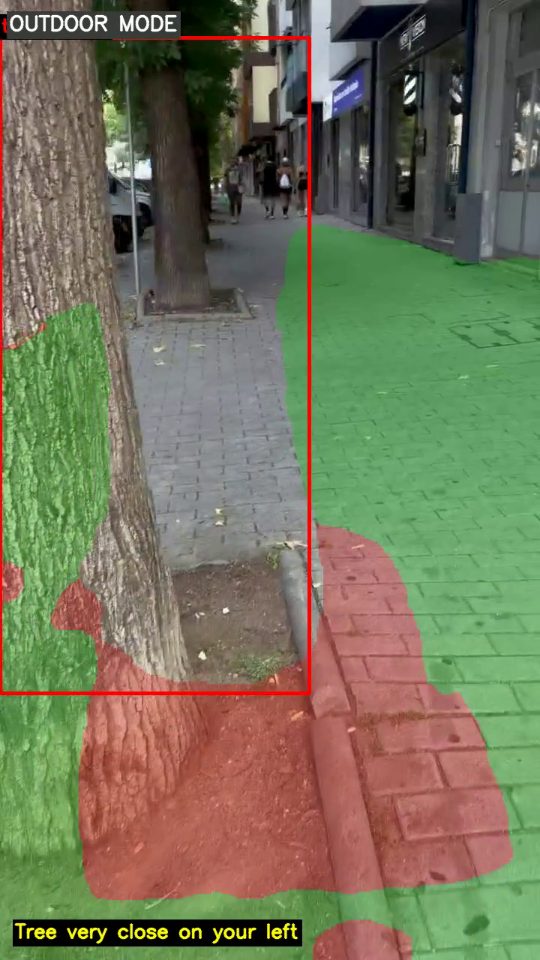
Camera view of a pavement with a tree trunk close on the left, marked in red, and the caption: Tree very close on your left.
“Tree very close on your left.”
43 millionpeople are blind worldwide1
295 millionlive with moderate or severe vision loss1
1 phoneno extra hardware to buy or carry
2.5×per second the way ahead is checked

A white cane finds what it touches. Nothing more.

A cane covers about one metre in front of your feet. It cannot tell you that a pole is coming, that there is a hole two steps ahead, that a door is open or closed, or that the path bends left and you are drifting onto the grass. Guide dogs help, but they take years and large budgets to train, and waiting lists are long.

Apps that describe a photo help you read a sign – but you have to stop, aim and wait. Walking needs something that keeps watching and only speaks when it matters.

How it works

  1. Wear the phone

    On a lanyard or chest clip, camera facing forward. Open WisePath and tap the top half of the screen for indoor, the bottom half for outdoor.

  2. Walk – it watches

    WisePath warns you early (“Pole slightly left, about 2 meters”) and again, urgently, if you get close (“Tree very close on your left”). Otherwise it stays quiet.

  3. Tap to ask, hold to finish

    Tap anywhere: “Closest to you, a bench on your right, about 3 meters away. Then a trash can…”. Press and hold to end the trip. No menus, no buttons to find.

Two modes, one gesture

Outdoor

  • Holes and broken pavement, manhole covers and kerbs – warned up to 4 m ahead
  • Bollards, poles, trees, bins, bicycles, cars and people in your way
  • Stay on the path: “Grass on your left. Move a little to the right.”, “The path curves to the right ahead.”, “You’ve left the path. It’s on your right.”
  • Crosswalks announced as you reach them
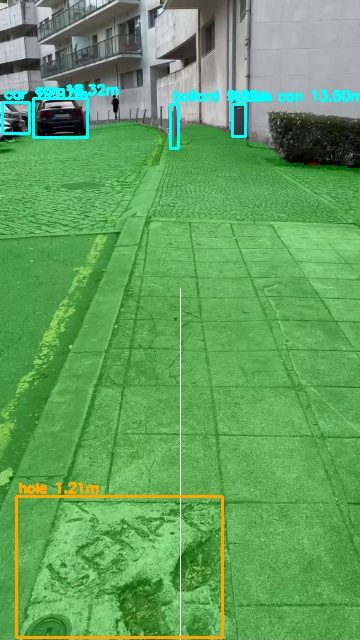
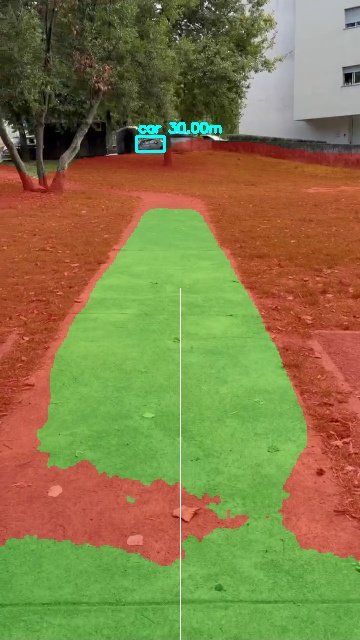
A stone pavement with a broken hole outlined in orange, labelled hole 1.2 meters. WisePath says: Careful, hole ahead, about 1 meter. A park path shown in green with grass in red on both sides. WisePath says: Grass on your left. Move a little to the right.

Indoor

  • Doors – and whether they are open or closed
  • Chairs, tables, sofas, cabinets, stairs and people, with the distance
  • Find your medication: pill boxes and blister packs within reach
  • “What’s around me?” lists everything, nearest first
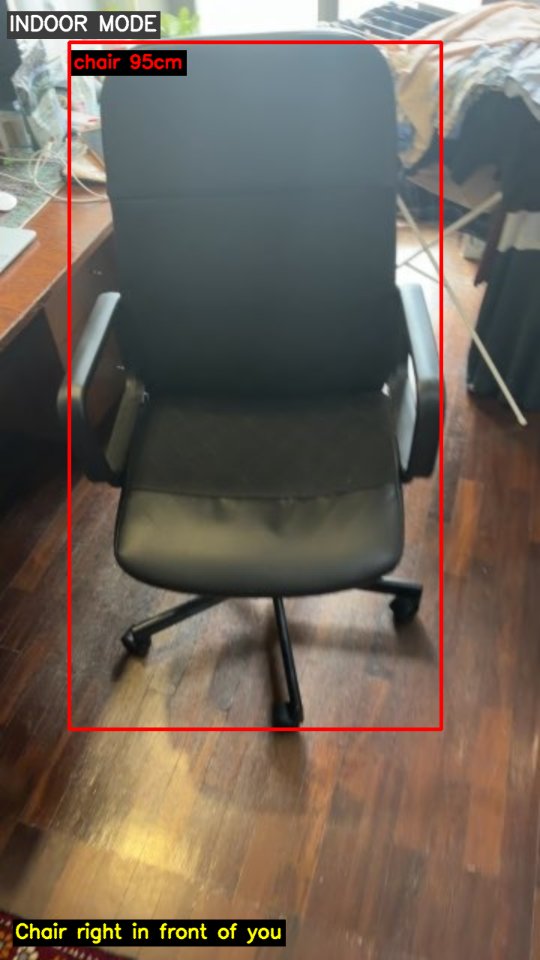
An office chair outlined in red, labelled chair 0.95 meters. WisePath says: Chair right in front of you.

See – and hear – a real walk

35 seconds on a city street, recorded with an iPhone and run through WisePath exactly as it runs live. Boxes show what was detected and how far away it is; the voice is what the user hears.

Read the transcript
  1. 0:01 Careful, manhole cover slightly right, about 2 and a half meters.
  2. 0:03 Crosswalk right in front of you.
  3. 0:07 Trash can slightly right, about 2 and a half meters.
  4. 0:11 Tree ahead, about 2 meters.
  5. 0:12 (tap) You’re on open paved ground.
  6. 0:16 Careful, crosswalk ahead, about 4 meters.
  7. 0:21 Careful, crosswalk ahead, about 2 and a half meters.
  8. 0:26 (tap) Closest to you, a crosswalk straight ahead, about 1 and a half meters away. Then a manhole cover on your left… a trash can on your left… a motorcycle on your right, about 7 meters away.
  9. 0:32 Tree ahead, about 2 meters.
  10. 0:32 Tree very close on your left.

Technology

Vision models trained for walking

Object detection fine-tuned on our own street recordings for holes, bollards, poles, bins, trees and crosswalks, plus a walkable-ground model that separates paving from grass and soil.

Distance, not just names

Every warning comes with metres. Distance is estimated from known object sizes, the ground plane and a monocular depth network – from a single phone camera.

Speaks only when it matters

Early and urgent warnings, priorities that let an urgent warning interrupt, and silence when the way is clear. A natural human voice, not a robotic one.

Built for VoiceOver

Two large touch zones, one tap, one hold. Everything is labelled for screen readers and spoken aloud.

Private by design

Camera frames are analysed and discarded. No video is stored, no account is needed to try it.

Runs today

Working prototype: iPhone camera streamed to an AI server over Wi-Fi. Next: a fully on-device app for iOS and Android.
Roadmap

  1. 2026 Working prototype · indoor and outdoor modes · first street dataset and trained models
  2. Q1 2027 Pilot with blind and low-vision walkers and orientation & mobility trainers
  3. Q3 2027 On-device iOS app on the App Store · more cities in the training data
  4. 2028 Android · wearable camera clip · partnerships with associations, municipalities and insurers

About WisePath

WisePath started from one question: what would a sighted friend say while walking next to you? Not a description of everything – just “careful, hole ahead”, “the path bends right”, “the door is open”.

Founder: Amin Salimi – AI and computer-vision engineer.

We are looking for pilot users, associations for the blind, orientation & mobility trainers and early investors who want to help millions of people walk with confidence.

Join the pilot

Tell us a little about you – user, trainer, association or investor – and we’ll be in touch.

Or write to vision@wisepath.site